By ACA LAMKA – Digital Marketing School
JavaScript has become an essential part of modern website development. Interactive menus, dynamic content, product filters, web applications, animations, dashboards, and many other features rely on JavaScript. However, JavaScript can also create SEO challenges when search engines cannot easily discover, render, or index important content.
Understanding JavaScript SEO helps website owners, developers, SEO professionals, and digital marketers build websites that are both interactive and search-engine friendly.
What Is JavaScript SEO?
JavaScript SEO is the process of optimizing JavaScript-powered websites so that search engines can crawl, render, understand, and index their content effectively.
Traditional HTML websites generally deliver their content directly in the initial HTML response. JavaScript websites may require additional processing before important content becomes visible.
For example, a website might initially deliver:
<div id="products"></div>JavaScript may then retrieve product information and insert it into the page.
If important content is only available after JavaScript execution, search engines need to process that JavaScript before they can fully understand the page.
How Search Engines Crawl JavaScript Websites
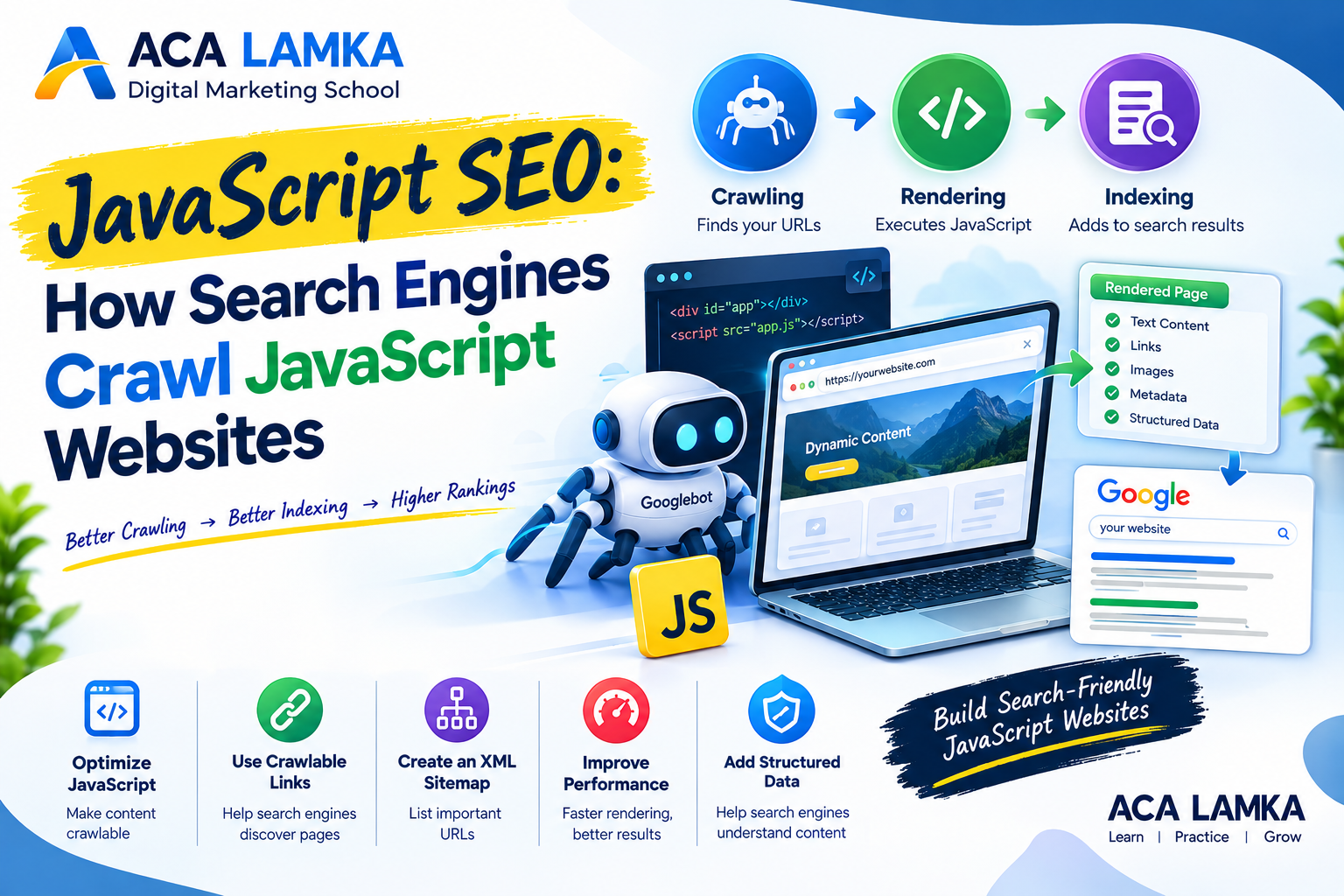
Search engines generally process JavaScript websites through several stages. JavaScript crawling and indexing
1. Crawling
The first stage is crawling.
A search engine crawler, such as Googlebot, discovers URLs through links, sitemaps, redirects, and other signals. It requests the webpage from the server.
A well-structured website should make important pages discoverable through normal HTML links and an XML sitemap.
2. Processing the HTML
The crawler receives the initial HTML document.
At this stage, some JavaScript-powered websites may contain only limited visible content. Important information might be loaded later through JavaScript.
This is why relying entirely on client-side JavaScript for essential SEO content can create problems.
3. Rendering JavaScript
Search engines can render JavaScript to understand content generated or modified by JavaScript.
During rendering, the browser-like rendering process executes supported JavaScript and produces a rendered version of the page.
This can allow search engines to discover content that wasn’t present in the original HTML response.
4. Indexing
After processing and rendering, search engines analyze the page and determine what content and information can be added to their index.
If important content, links, structured data, titles, or other SEO elements are inaccessible or incorrectly generated, indexing may be affected.
Why JavaScript Can Create SEO Problems
JavaScript itself is not automatically bad for SEO. The problem occurs when JavaScript prevents search engines or users from accessing important information.
Common problems include:
- Important content loaded only through JavaScript
- JavaScript errors
- Poor internal linking
- Incorrect URL structures
- Content requiring user interaction
- Blocked JavaScript resources
- Incorrect canonical URLs
- Missing metadata
- Client-side redirects
- Slow rendering
- Infinite scrolling without crawlable URLs
- JavaScript-generated structured data implemented incorrectly
A technically advanced website can still have SEO problems if search engines cannot reliably access its important content. How search engines crawl JavaScript
JavaScript Rendering vs Server-Side Rendering
There are several ways to deliver JavaScript content.
Client-Side Rendering (CSR)
With client-side rendering, the browser receives a basic HTML document and JavaScript generates much of the page content.
Advantages:
- Highly interactive experiences
- Useful for web applications
- Reduced server-side rendering workload
Potential SEO challenges:
- Search engines may need additional rendering
- Initial content may be limited
- Rendering can introduce performance issues
Server-Side Rendering (SSR)
With server-side rendering, the server generates HTML containing the page’s content before sending it to the browser.
This can make important content immediately available in the HTML response.
SSR can be particularly useful for content-heavy websites where search visibility is important.
Static Site Generation (SSG)
Static site generation creates HTML pages ahead of time.
This approach can provide fast initial page delivery and makes important content available in the HTML.
The appropriate approach depends on the website’s purpose, technology, content, and performance requirements.
How to Make JavaScript Websites SEO-Friendly
1. Make Important Content Available in HTML
Your most important SEO content should not depend unnecessarily on JavaScript. JavaScript SEO
Make sure search engines can access:
- Main headings
- Body content
- Product information
- Navigation
- Important internal links
- Images and relevant image information
- Structured data
- Important calls to action
2. Use Crawlable Internal Links
Internal links help search engines discover pages and understand website architecture.
Prefer standard HTML links such as:
<a href="/digital-marketing-course/">Digital Marketing Course</a>Avoid relying entirely on JavaScript click events that do not provide conventional crawlable URLs.
3. Check Your Robots.txt File
Your robots.txt file should not accidentally prevent search engines from accessing resources required to understand your pages.
For example, unnecessarily blocking JavaScript or CSS resources can interfere with rendering.
Always review your robots.txt configuration when troubleshooting JavaScript SEO.
4. Create an XML Sitemap
An XML sitemap provides search engines with a list of important URLs on your website.
For example:
<url>
  <loc>https://example.com/digital-marketing-course/</loc>
</url>
Keep your sitemap updated and include canonical URLs that you want search engines to discover.
5. Use Proper Page Titles and Meta Descriptions
Every important page should have a meaningful title and meta description.
For example:
Title:
Digital Marketing Course in Lamka | ACA LAMKA
Meta description:
Learn practical digital marketing, SEO, Google Ads, Meta Ads and e-commerce skills at ACA LAMKA.
If JavaScript dynamically changes metadata, verify that the final rendered page contains the correct information. JavaScript SEO
6. Optimize JavaScript Performance
Large JavaScript files can increase loading and processing time.
Consider:
- Minifying JavaScript
- Removing unnecessary scripts
- Code splitting
- Lazy loading appropriate resources
- Using browser caching
- Reducing third-party scripts
- Compressing files
- Improving server response time
Better performance can improve the experience for both users and search engines.
JavaScript SEO and Structured Data
Structured data helps search engines understand specific types of content.
For example, a website may use structured data for:
- Courses
- Products
- Articles
- Events
- Organizations
- Local businesses
- FAQs
If structured data is generated through JavaScript, check the rendered page and validate the implementation.
Do not add structured data that does not accurately represent visible page content.
JavaScript SEO for E-Commerce Websites
JavaScript is widely used in e-commerce websites for:
- Product filtering
- Shopping carts
- Product variations
- Reviews
- Recommendations
- Dynamic pricing
- Search
- Checkout systems
SEO becomes particularly important for product and category pages.
Make sure important products and categories have unique, crawlable URLs and that search engines can discover them through internal links or XML sitemaps.
For example:
example.com/shoes/
and
example.com/shoes/running-shoes/
should be accessible URLs rather than pages that appear only after a user performs a JavaScript action.
How to Test a JavaScript Website for SEO
A practical JavaScript SEO audit should include several checks.
Check 1: View the Source
Look at the original HTML source and determine whether important content exists before JavaScript execution.
Check 2: Inspect the Rendered Page
Compare the original HTML with the rendered DOM.
Look for differences in:
- Text
- Links
- Titles
- Metadata
- Images
- Structured data
Check 3: Use Google Search Console
Google Search Console can help website owners identify indexing and crawling issues.
Check:
- Page indexing
- URL inspection
- Sitemaps
- Crawl-related reports
- Search performance
Check 4: Test Important URLs
Select important pages such as:
- Homepage
- Service pages
- Blog posts
- Product pages
- Category pages
- Landing pages
Then verify that search engines can discover, render, and index them properly.
Common JavaScript SEO Mistakes
Mistake 1: Hiding Important Content Behind User Interaction
If essential content appears only after clicking a button or performing an interaction, accessibility and discoverability can become more complicated. How search engines crawl JavaScript
Mistake 2: JavaScript-Only Navigation
Navigation should provide crawlable links to important pages.
Mistake 3: Changing URLs Incorrectly
Single-page applications need a clear URL structure so individual pages or views can be discovered and indexed.
Mistake 4: Blocking Required Resources
Incorrect robots.txt rules can interfere with rendering.
Mistake 5: Ignoring Mobile Performance
A website that works well on desktop may still have performance problems on mobile devices.
Mistake 6: Forgetting Canonical URLs
Dynamic websites can accidentally create multiple URLs containing substantially similar content.
Use canonicalization appropriately to communicate the preferred URL.
JavaScript SEO Checklist
Use this checklist when auditing a JavaScript website:
- ✅ Important content is accessible
- ✅ Important pages have unique URLs
- ✅ Internal links use crawlable URLs
- ✅ XML sitemap is available
- ✅ Robots.txt does not block essential resources
- ✅ Page titles are correctly implemented
- ✅ Meta descriptions are present
- ✅ Canonical URLs are correct
- ✅ Structured data is valid
- ✅ JavaScript errors are investigated
- ✅ Website works effectively on mobile
- ✅ Core Web Vitals and performance are monitored
- ✅ Important pages can be discovered through internal links
- ✅ Google Search Console is regularly monitored
JavaScript SEO for Digital Marketers
Digital marketers do not necessarily need to become JavaScript developers, but understanding how JavaScript affects SEO is increasingly valuable.
An SEO professional working with developers should understand the difference between:
Raw HTML → JavaScript Rendering → Rendered Content → Indexing
This makes it easier to identify whether an SEO problem is related to content, crawling, rendering, indexing, or website architecture.
For businesses, this is especially important when migrating from a traditional WordPress website to a JavaScript framework or developing a modern web application.
FAQ FOR ACA – LAMKA
Conclusion
JavaScript enables businesses to create fast, interactive, and highly engaging websites, but SEO should be considered during development rather than added afterward.
A search-friendly JavaScript website should provide crawlable URLs, accessible content, reliable internal links, appropriate metadata, structured data, strong performance, and a technically sound website architecture.
For digital marketers and website owners, learning JavaScript SEO provides an important advantage when working with modern websites and development teams.
Learn Digital Marketing and SEO at ACA LAMKA
ACA LAMKA – Digital Marketing School focuses on practical digital marketing skills, including SEO, technical SEO, on-page SEO, off-page SEO, Google Ads, Meta Ads, social media marketing, content marketing, website marketing, e-commerce, analytics, and lead generation.
Students can use practical projects to understand how SEO and digital marketing work in real-world business environments.
Start learning SEO and digital marketing with ACA LAMKA.
Table of Contents

https://www.youtube.com/@adcampaignacademy
https://www.facebook.com/adcampacademy
https://www.instagram.com/adcampacademy
https://www.reddit.com/user/digitalmang44